
The Mask property defines the format of the input’s entered values.
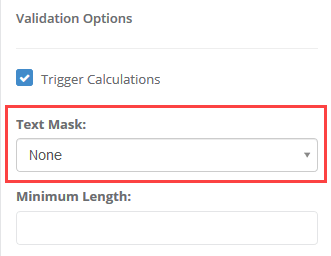
The following formats are supported:
- None: A standard textbox input allowing for free-form string values.
- Decimal: A numeric textbox input allowing for decimal values.
- Integer: A numeric textbox input allowing for integer values.
- Percentage: A numeric textbox input allowing for percentage values. The percentage will be displayed in the textbox with a percentage sign (%) but will be sent as a decimal to the calculation engine (e.g. 50 % => 0.5).
- Currency ($): A numeric textbox input allowing for USD currency values.
- Currency (€): A numeric textbox input allowing for EUR currency values.
- Currency (£): A numeric textbox input allowing for GBP currency values.
- Time: A textbox input allowing for time values to be entered. In many cases, the Calendar control is a better option for time-based inputs.
- US Date: A textbox input allowing for date values to be entered. In many cases, the Calendar control is a better option for date-based inputs. This is oriented towards United States formatting, which includes the month first, followed by the day (i.e. MM/DD).
- EU Date: A textbox input allowing for date values to be entered. In many cases, the Calendar control is a better option for date-based inputs. This is oriented towards the global formatting, which includes the day first, followed by the month (i.e. DD/MM).
- Masked: You can use “Masked” type for entering password style inputs. Saved values and calculations will still use entered value.
Enable Thousand Separator property adds comma separators for input numbers. This option only becomes available when you select a numeric Mask option such as Decimal, Integer, Percentage, and Currency.